When setting up your Google App Engine application, you may wonder how to set an environment variable (such as secrets)
at build time.
There are different approaches for this, but some of them require updating your server's code as in [2].
This post shows a method to achieve the same result without modifying your application.
In the following example, we will try to set a variable GTAG_ID at build time of a Google App Engine application. You can find the full repository at https://github.com/nlbao/pocket_stats.
Dataflow #
graph LR; trigger(Cloud Build Trigger variable's value); cb(cloudbuild.yaml); cenv(cloud_env.sh); build-env(build environment); trigger==>cb; cb==>cenv; cenv==>build-env; build-env==>application;
Step 1 - Create a Cloud Build Trigger #
Follow this https://cloud.google.com/source-repositories/docs/integrating-with-cloud-build#creating_a_build_trigger to:
- Enable Cloud Build API for your application.
- Connect it with your Github / Gitlab repository.
- Create a Build Trigger.
Note: you might not need a Dockerfile, a build config file is enough.
Step 2 - Define the variable in your Build Trigger #
Go to https://console.cloud.google.com/cloud-build/triggers, and add the variable to your created trigger:
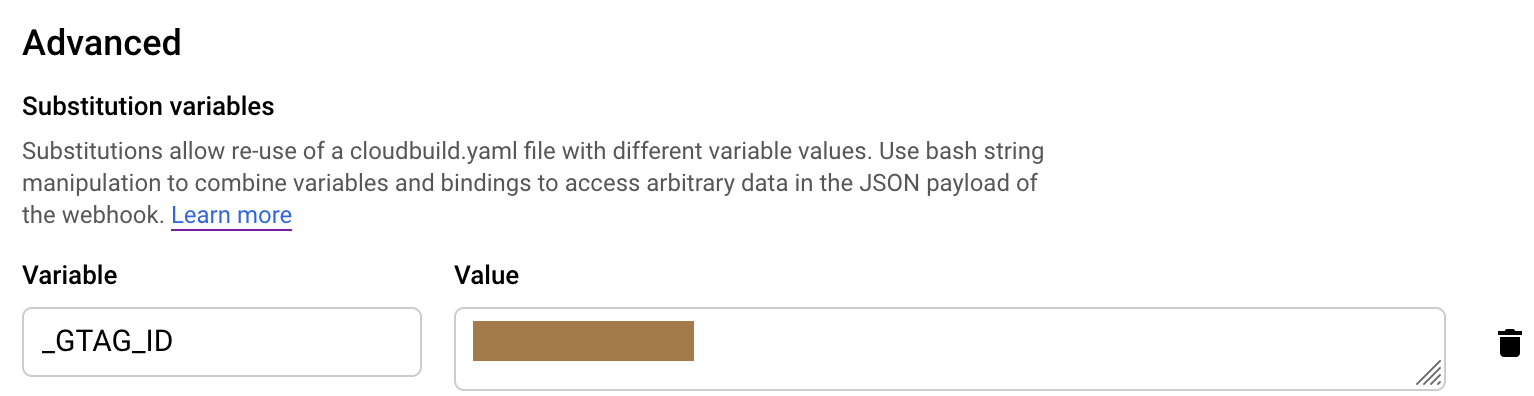
The variable's name must start with a _.
Step 3 - Define the variable in your app.yaml #
https://github.com/nlbao/pocket_stats/blob/master/app.yaml
env_variables:
  GTAG_ID: "%GTAG_ID%"
Note that we need to surround the variable's name by % %, so the script in the next step could detect it.
Step 4 - Create a script to substitute the variable's value #
https://github.com/nlbao/pocket_stats/blob/master/cloud_env.sh
sed -i 's/%GTAG_ID%/'$GTAG_ID'/g' app.yaml
At build time, this script will replace %GTAG_ID% with the value set in the Cloud Build trigger.
Step 5 - cloudbuild.yaml: add a step to execute the script #
https://github.com/nlbao/pocket_stats/blob/master/cloudbuild.yaml
steps:
- name: "ubuntu"
args: ["bash", "./cloud_env.sh"]
env:
- "GTAG_ID=${_GTAG_ID}"
You must define this step before any other steps.
References #
1. How to set environment variables using Google Cloud Build or other method in Google App Engine Standard Environment?
2. How to add environmental variables to Google App Engine (node.js) using Cloud Build
Since you've made it this far, sharing this article on your favorite social media network would be highly appreciated!
For feedback, ping me on Twitter.
All the information on this blog are my own opinions and do NOT represent the views or opinions of any of my past or current employers.
Published